|
Zakładka z wyszukiwarką danych komponentów |
|
|
Zakładka z wyszukiwarką danych komponentów |
|
FDC2114 Arkusz danych(PDF) 16 Page - TEXAS ADVANCED OPTOELECTRONIC SOLUTIONS |
|
|
|||||||||||||||||||||||||||||
FDC2114 Arkusz danych(HTML) 16 Page - TEXAS ADVANCED OPTOELECTRONIC SOLUTIONS |
|
|
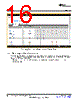
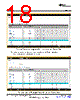
16 / 62 page  GUI Operation www.ti.com Figure 16. Selecting Auto-Read Interval on Register Page 3.4.2 Manually Updating Device Register Values There are two methods to change register values: update the entire register value or change a single bit within the register. The recommended update mode is always “Immediate” and not “Deferred”. To update register values, follow these steps. 1. Double-click the current value of the register that needs to be changed. The text will turn into an editable text box 16 FDC2114 and FDC2214 EVM User’s Guide SNOU138 – June 2015 Submit Documentation Feedback Copyright © 2015, Texas Instruments Incorporated |
|
Link URL |
| Czy Alldatasheet okazała się pomocna? [ DONATE ] |
O Alldatasheet | Reklama | Kontakt | Polityka prywatności | Link do karty katalogowej | Linki | Lista producentów All Rights Reserved©Alldatasheet.com |
| Russian : Alldatasheetru.com | Korean : Alldatasheet.co.kr | Spanish : Alldatasheet.es | French : Alldatasheet.fr | Italian : Alldatasheetit.com Portuguese : Alldatasheetpt.com | Polish : Alldatasheet.pl | Vietnamese : Alldatasheet.vn Indian : Alldatasheet.in | Mexican : Alldatasheet.com.mx | British : Alldatasheet.co.uk | New Zealand : Alldatasheet.co.nz |
|
Family Site : ic2ic.com |
icmetro.com |
 Polish ▼
 English
 Chinese
 German
 Japanese
 Russian
 Korean
 Spanish
 French
 Italian
 Portuguese
 Polish
 Vietnamese
 Indian
 Mexican
 British
 New Zealand